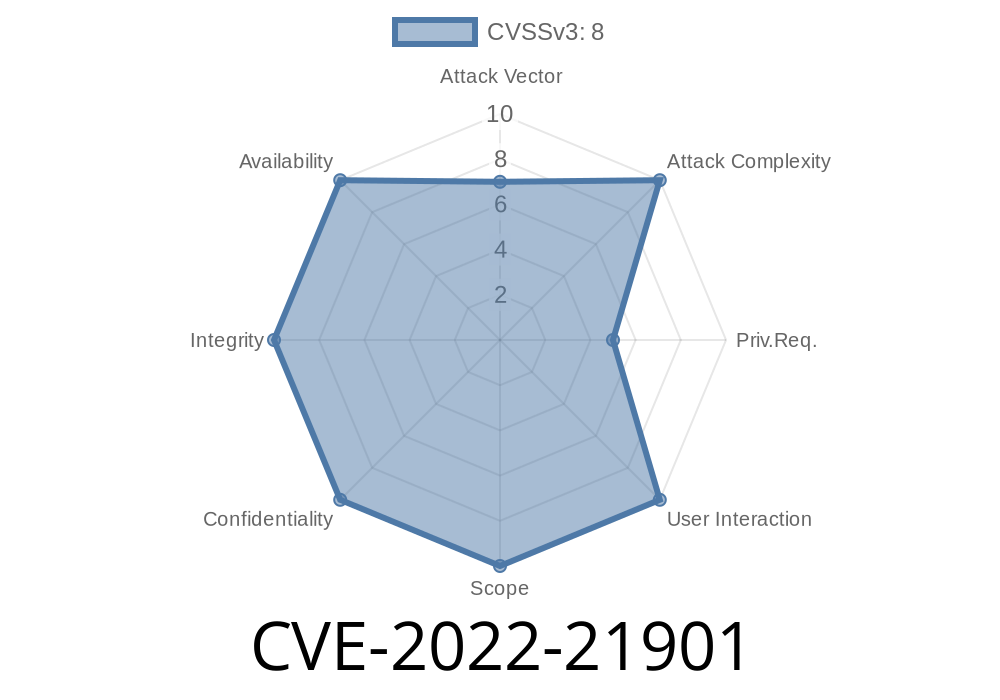
In early 2022, security researchers discovered a serious vulnerability affecting Microsoft’s virtualization technology, Hyper-V. This vulnerability, tracked as CVE-2022-21901, opened the door for attackers with limited access inside a virtual machine to gain elevated privileges—potentially breaking your machine’s security model.
If you're running virtual machines on Windows servers at work or at home, it's crucial to understand how CVE-2022-21901 works, why it's dangerous, and what you can do to stay safe. Let's break it down, explore the details, and look at some code to make things clearer.
What is CVE-2022-21901?
CVE-2022-21901 is an elevation of privilege vulnerability in Microsoft's Hyper-V, the core service that runs virtual machines on Windows systems. If an attacker could run code on a guest virtual machine with limited permissions, they might be able to escape that VM and obtain higher-level permissions on the host system—such as SYSTEM or even administrator rights.
Severity:
Attack Vector: Local (the attacker already needs access to a VM)
- Patch released: Microsoft Patch Tuesday, January 2022
Why Is This Such a Big Deal?
Hyper-V is supposed to isolate virtual machines from each other and from the host system. If that barrier fails, attackers can take control of other VMs or the main server, steal data, or disrupt services. In cloud environments or enterprise servers, this could mean compromising whole companies.
Root Cause
While Microsoft’s advisory (source) doesn’t disclose everything, careful analysis of public information and security blogs suggests the vulnerability comes from improper handling of memory management between host and guest. Specifically, a user in a guest VM sends specially crafted requests to Hyper-V's service, causing it to perform unsafe memory operations.
Example Exploit Code Snippet
While a full exploit isn't disclosed to the public for ethical reasons, here’s a simplified, non-malicious C code snippet to show how memory bugs in device drivers can lead to privilege escalation:
// Pseudo code: vulnerability pattern

HANDLE hDevice = CreateFileA("\\\\.\\VulnerableHyperVDevice", ...);

char exploitBuffer[512];
ZeroMemory(exploitBuffer, sizeof(exploitBuffer));

// Normally, a well-formed structure is expected
// An attacker crafts an oversized or under-initialized structure
DWORD bytesReturned;
DeviceIoControl(
    hDevice,
    MALFORMED_IOCTL,             // Imaginary control code triggering issue
    exploitBuffer,
    sizeof(exploitBuffer),
    NULL,
    ,
    &bytesReturned,
    NULL
);

// If Hyper-V fails to validate input properly, it can overwrite critical kernel pointers.
> Note: Above is just a simplified example! Don’t try this on production systems.
Real Exploit Possibilities
- Install a basic VM, get a shell, and run code simulating the above attack (in the real vulnerability, complex structures/requests are used).
Patching and Workarounds
Microsoft’s official fix for this vulnerability is included in January 2022 cumulative updates. See the patch notes:
https://msrc.microsoft.com/update-guide/vulnerability/CVE-2022-21901
How to Make Sure You’re Protected:
Servers: Install the latest Windows Updates. Versions 2012, 2016, 2019, and 2022 are affected.
- Workstation/Desktops: Make sure automatic updates are enabled, especially if you use VirtualBox or Hyper-V for development.
- Cloud Providers: Most major clouds (e.g., Azure) patched this rapidly. If you run your own Hyper-V infrastructure, double-check patch status.
# Check if your system is patched (PowerShell example)
Get-HotFix | Where-Object {$_.Description -eq "Security Update" -and
  $_.InstalledOn -gt "01/11/2022"}
References and Further Reading
- Microsoft Security Response Center: CVE-2022-21901
- Microsoft Hyper-V Documentation
- Mitre CVE Record
Final Thoughts
CVE-2022-21901 is an example of how complex virtualization technology can contain subtle bugs that lead to big security problems. Keeping Hyper-V up to date is absolutely critical, especially if you host public-facing virtual machines or sensitive workloads.
Action Steps:
Consider restricting who can access guest VMs in your environment.
It's always better to stay ahead of the game when it comes to virtual machine security—never assume your VM is as isolated as you think it is!
If you found this write-up helpful or have further questions, let us know in the comments or check out more vulnerability breakdowns in our blog. Stay safe and always be patching!
Timeline
Published on: 01/11/2022 21:15:00 UTC
Last modified on: 05/23/2022 17:29:00 UTC