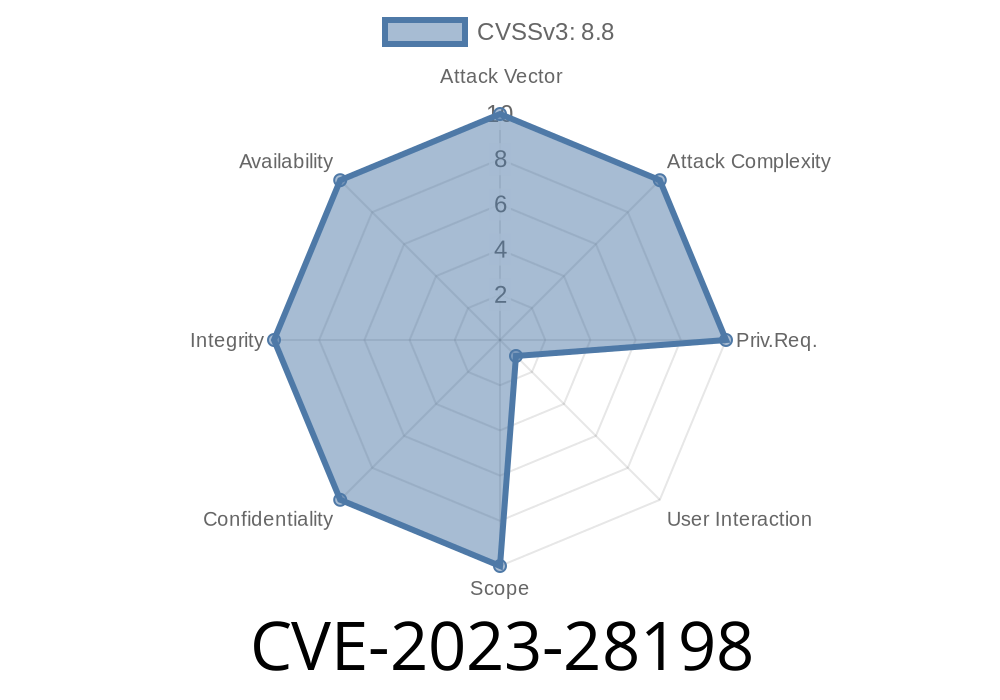
If you use an iPhone, iPad, or Mac, you’re probably hearing a lot about software updates. Sometimes, updates fix small bugs, but in other cases, they fix major security holes. One such critical issue is CVE-2023-28198—a dangerous flaw in WebKit, the browser engine used in Safari and many Apple apps. Let’s explore what this vulnerability is, how it works, and why you should care.
What Is CVE-2023-28198?
CVE-2023-28198 is a _use-after-free_ vulnerability found in WebKit. In simple terms, a use-after-free happens when a program continues to use a chunk of computer memory after it’s already been released or “freed.” Hackers can use this to run any code they want on your device—just by making you visit a malicious webpage.
Apple fixed this bug in:
macOS Ventura 13.3
If you haven’t updated your Apple devices to these versions or newer, you are at risk.
Official Apple advisory:
- HT213437 – About the security content of iOS 16.4 and iPadOS 16.4
- HT213434 – About the security content of macOS Ventura 13.3
Technical Details: What Does “Use-After-Free” Mean?
In programming, memory management keeps track of which parts of your RAM are being used. When an object (like an image or text node in a webpage) is no longer needed, the browser frees its memory up.
But sometimes, due to a bug, a part of the browser might still have a reference (pointer) to that memory—and use it after it’s been freed, hence the name "use-after-free". If an attacker carefully controls what’s put in that freed memory slot, they can sneak in their own code.
How Attackers Exploit CVE-2023-28198
A victim could be tricked into visiting a specially made website. That site might load images, HTML, or JavaScript in a way that triggers the use-after-free bug. The attacker can then:
Hijack your device to run arbitrary code—meaning malware or spyware.
Here’s a simplified scripting flow to cause a use-after-free in WebKit. This is not the actual exploit, but a simulation to show the concept:
// Example: How a Use-After-Free Bug Might Be Triggered in WebKit

let victimNode = document.createElement('img');
document.body.appendChild(victimNode);

victimNode.addEventListener('load', function(){
    // Remove the image from the DOM and free its memory
    document.body.removeChild(victimNode);

    // Later, the browser might try to use victimNode again, but it's gone!
    // At this point, attacker-controlled data could occupy that old memory spot
});

victimNode.src = 'https://attacker-server.com/image.png';;
In a real attack, the code would be far more complex and carefully crafted. The main idea is to “free” an object, then trick the browser into using it again.
Proof-of-Concept (PoC): A Glimpse
Here’s a snippet (simplified) that demonstrates the idea.
Warning: Do not run this code outside a safe testing environment!
// Hypothetical concept, not an actual exploit

let arr = new Array(1);
arr[] = document.createElement('div');

function triggerUAF() {
    // Free arr[] somewhere in browser internals (hypothetical)
    arr[] = null;

    // Allocating new object in the same space memory
    let attacker = {evil: 'data'};
    // If browser wrongly uses freed arr[], it may point to attacker’s data
}

triggerUAF();
Security Patch: What Did Apple Change?
Apple’s engineers improved memory management to make sure objects aren’t accessed after being freed. In the real WebKit codebase, this meant using “smart pointers” and better checks to track whether an object is still valid before using it.
How to Protect Yourself:
Further Reading and References
- WebKit Security Advisory for CVE-2023-28198
- Apple Security Updates
- Understanding Use-After-Free Vulnerabilities (OWASP)
- Common Vulnerabilities and Exposures: CVE-2023-28198
Conclusion
CVE-2023-28198 is a clear reminder why you should always keep your devices up-to-date. Attackers can use tricky website code to exploit powerful vulnerabilities like “use-after-free” bugs, risking your personal data and device security.
Stay safe by updating promptly, and remember—sometimes a five-minute software update is all that stands between you and a malware infection!
*This post is written exclusively for knowledge-sharers, pen-testers, and anyone curious about how modern web security works. Always use cybersecurity knowledge for defense—never for harm.*
Timeline
Published on: 08/14/2023 23:15:00 UTC
Last modified on: 09/11/2023 18:15:00 UTC